Are you using YouTube content illegally?
YouTube is one of the most popular platforms used in education, as educators recognise its potential to offer rich examples, real-world context, multimodal learning and existing student engagement.
But there’s a huge issue across schools, universities and colleges, as many educators are unintentionally using YouTube videos in ways that are not legal. And most don’t know that what they’re doing breaks copyright law and YouTube’s Terms of Service.
Copyright applies to all online content, even when it’s freely available on a reputable channel like YouTube. And the risks include:
- Unknowingly using pirated material
- Embedding illegal content in the VLE
- Incorporating downloads into lecture capture
- Misleading students about what is “okay to use” online
Most copyright breaches in teaching aren’t deliberate… but they still have consequences.
This article breaks down in simple, practical terms what’s allowed, what’s not, and how to ensure you aren’t breaking the law.
1. It is only legal to use a YouTube video in your teaching if that video was uploaded legally
Before we get on to the nitty-gritty of how you use the content on YouTube, we first need to ensure that the video itself is legal. And this is the biggest misconception, so let’s be crystal clear.
You can only use a YouTube video at all if it was uploaded legally by the rights holder (or an authorised channel).
We cannot stress this enough. You must not use YouTube videos in your teaching if the upload is not legitimate.
2. How to tell if a YouTube video is legal
OK, but how do you know? You usually can’t know with absolute certainty, but you can make a strong, defensible judgment using the indicators below.
A. Check the channel
✅ Green flags | Legitimate channels include:
- Broadcasters (BBC, Channel 4, ITV, Sky)
- Production companies
- Film distributors
Videos uploaded come from the same broadcaster/producer/distributor that owns the channel.
⛔️ Red flags | Illegitimate channels often have:
- Personal usernames (“FilmFan_04”)
- Unbranded accounts
- Spammy SEO channel names (“FreeFilms”)
They contain videos from mixed/multiple sources.
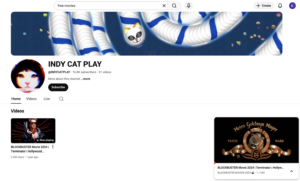
Screenshot from a personal account offering a full free film to watch.
B. Look at the video description
✅ Green flags | Official uploads include:
- Licensing info
- Production credits
- Links to official sites
⛔️ Red flags | Illegal uploads often have:
- No description
- Spammy SEO upload titles (“FULL MOVIE HD 2024”)
- Random emojis
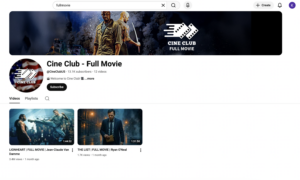
Example of a spammy SEO upload title.
C. Assess the quality
✅ Green flags | Legal uploads usually:
- Are in HD or high resolution
- Have proper thumbnails
- Are in the correct aspect ratio
⛔️ Red flags | Illegal uploads often have:
- Cropping
- Blurriness
- Watermarks
- Hardcoded subtitles
D. Check for Content ID and monetisation
Rights holders don’t upload content for no reason; they are looking to monetise their IP. So if you see:
✅ “Licensed to YouTube by…”
✅ Ads controlled by rights holders
✅ Copyright notices
…it’s a good sign it’s legitimate.
E. Look at the length
Lastly, look at the length/duration of the video.
⛔️ Full films
⛔️ Complete episodes
⛔️ Whole documentaries
These very rarely appear legally on non-official channels. As you can see from the official BBC channel below, all videos are short clips of content.
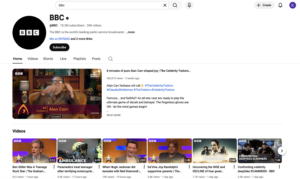
BBC YouTube Channel
If it looks too good to be true… it probably is.
⛔️ If the video has not been legally uploaded, DO NOT USE IT.
This is the stance taken by:
- Your own copyright and legal teams
- The rights holders and their legal teams
- External licensing organisations like ERA
- Learning on Screen – that’s us!
If you use this content, you are creating a huge risk and exposing your institution to legal challenges and fines. There is a reason why institutions invest in above-board platform providers and an ERA licence.
✅ For example, our very own Box of Broadcasts, which offers millions of copyright-cleared films, documentaries, TV programmes and radio shows.
It’s because very rarely are there free alternatives that don’t break the law. You are unlikely to find an entire piece of content that you want/need freely available on YouTube.
3. How to use a legitimate video legally
Even if the video has been uploaded legitimately, there are still restrictions on how you can use it.
What is allowed?
✅ Linking to a YouTube video
If the video has been uploaded legally to YouTube, then it’s completely fine to use and share links in your teaching materials as students watch it on YouTube itself.
However, due to content being removed and moved by legitimate channels, you should audit these links 3-4 times a year to ensure they still work/link to the right content.
✅ Embedding a YouTube video
It’s legal to embed an official YouTube video, for example, in your VLE, because it still streams directly from YouTube.
✅ Showing a legitimate video in class
If the video is genuinely uploaded by the rights holder and you’re streaming it directly from YouTube, this is allowed. You can show it live to students in a classroom/lecture theatre.
What is NOT allowed?
Even if the video has been uploaded legally, there are still some no-go areas.
⛔️ Downloading YouTube videos
You are not allowed to download videos and use them in either:
- PPT slides
- Lecture recordings
- VLE uploads
- Classrooms
This is a direct breach of the following:
- YouTube’s Terms of Service
- Copyright law
- Your institution’s own compliance policies
⛔️ Clipping YouTube videos
Under no circumstances are you allowed to edit content from YouTube, even if it was uploaded legally. Editing of any kind is not permitted.
This is a major limitation for teaching, because high-quality, targeted clips are incredibly valuable for learning: they let you focus students’ attention, analyse key scenes, avoid irrelevant material, and improve accessibility and cognitive load.
✅ This is exactly why Box of Broadcasts (BoB) includes a built-in legal clipping tool.
Everything on BoB is already covered by the ERA licence, meaning you can create precise, pedagogically useful clips, store them, embed them in your VLE, and reuse them year after year without any copyright risk.
⛔️ Storing YouTube content
Unless done within YouTube itself (e.g., playlists), storing content counts as copying – prohibited without permission.
✅ Box of Broadcasts (BoB) includes the option to create private or public playlists of entire broadcasts or of clips, making it easy to save content reliably and legally.
So are you breaking the law?
YouTube is brilliant for teaching — but only when used legally. Most educators break the rules unintentionally, simply because the copyright landscape is confusing. A little clarity goes a long way in keeping teaching compliant, accessible and student-friendly.
What can you do about it?
With millions of programmes and films available, if you’re in an institution that subscribes to Box of Broadcasts, then replace your YouTube links/embeds with the same BoB content. YouTube is not covered by the ERA licence. But Box of Broadcasts (BoB) is, which means you can legally:
- Record UK broadcast TV and radio
- Clip, edit and store content
- Embed directly in your VLE
- Use content in lecture capture
- Access transcripts and captions
- Create playlists and course-level collections
- Share securely with students anywhere in the UK
It’s the safe, compliant alternative built specifically for education.
If you aren’t a subscriber, get in touch for a free trial in the form below.
Need copyright training?
Was this all news to you? Are you worried you’re breaching copyright laws in other ways? If you want to train your institution on lawful media use, check out our copyright course today. All our members get 50% off, so get in touch for your unique discount code.
Interested in trying BoB for free?
Get in touch to start a free two-week trial for your institution.
Get in touch